Posts

Layout design in Android Studio
Image
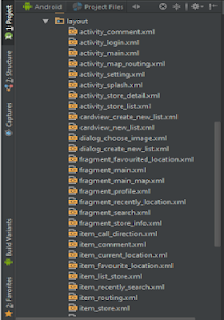
Today when start optimizing the codebase of my project, I saw this: Look at the list of XML files inside my  res/layout  folder. Horrible, right? Now, look at yours. Is your  res/layout  too big, hard to control? Your project have too many features, too many screens? Let imagine while confusing running for the deadline, and you can’t find the XML layout that need to be fixed  just because you can’t remember the file name. Wandering search online, I find out that many people have the  same problem  as me. So I decide to write an article to share some tips for better manage  res/layout  folder in  Android Studio . Step 1 First create a parent layouts folder. Right click in  res , select  New  →  Directory , type  layouts (remember the  ‘s’  or it will be duplicated). I call it “ layouts”   because it is parent folder to hold all l...

Back Again With Interested Topic is Robotic

Hello everyone, How are you? I'm back! sorry, I was busy with my projet. now I'll share with you lots of knowledge about ANDROID also Robotic, Those days I learn Robotic perfectly. if you have any problem or question about Robotic you can contact me any time, I'll solve it as early as possible. Thank you 

My PIcture

Image

Remind Me

Image
Don't miss any thing in you life .just use this app https://play.google.com/store/apps/details?id=com.shahed.remiendme

Android Material design Android FAB (Floating Action Button) Animations

Image
Creating Project Here i have created a Android Studio project with package shahedkhondaker .fabanimation  also Activity as  MainActivity  and layout as  activity_main . We have a larger FAB and two smaller FAB. When the larger FAB is pressed the two smaller FAB pop up. Initially the two smaller Fab are invisible.The layout  activity_main  is given as, activity_main.xml <? xml version = "1.0" encoding = "utf-8" ?> < android.support.design.widget.CoordinatorLayout      xmlns:android = "http://schemas.android.com/apk/res/android"      xmlns:app = "http://schemas.android.com/apk/res-auto"      xmlns:tools = "http://schemas.android.com/tools"      android:layout_width = "match_parent"      android:layout_height = "match_parent"      android:fitsSystemWindows = "true"   ...